
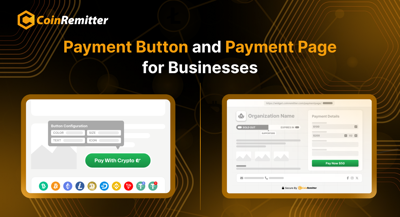

Recently, a cryptocurrency payment gateway named CoinRemitter launched widgets. They are said to be among the most user-friendly features for accepting cryptocurrency payments. The Payment Button and the Payment Page are also parts of 'Widgets'. Both of them offer a user-friendly integration process to help businesses accept payment in crypto.
Both these features share some similarities. However, there are some differences as well. If you are planning to accept crypto payments, and you are confused about which one to use, you must know these differences. In this article, we will talk about the differences between these two features.
Payment Button
The Payment Button Widget focuses on accepting cryptocurrency payments through a button. Business owners can use this feature to create a button and integrate it into their platforms. After a successful integration, customers will be allowed to make payments by clicking the same button.
Payment Page
The Payment Page Widget offers a complete web page-like solution to let businesses accept payment in crypto. Business owners can use this feature to create a dedicated page and link it to their checkout systems. This way, you can provide a complete web page interface for your customers and accept crypto payments.
Key Differences Between the Payment Button and the Payment Page
User Interface
Payment Button: Looks like a simple, clickable button with text and an icon.
Payment Page: Looks like a dedicated web page with text content (description, T&Cs, etc.) and input fields.
The Payment Button provides a minimal interface, while the Payment Page provides a detailed interface. For the platforms that don't want major modifications in the original UI, they can use the button. Those who want a more branded and flexible crypto payment solution can use the page feature.
Amount Flexibility
Payment Button: Customers can only pay the amount requested by the business.
Payment Page: Allows buyers to enter their preferred payment amount.
The Payment Button allows you to accept cryptocurrency payments, but in a fixed amount. On the other hand, the Payment Page offers both fixed and custom amount options. You just have to select 'Customer Decide Amount' in the 'Price Fields'. Then, customers will be able to enter the amount they want to pay.
Both solutions are ideal for accepting cryptocurrency donations, but the Payment Page has an edge. The freedom to donate the preferred amount makes donors feel considerate.
Widget Output
Payment Button: The system generates the button's JavaScript code based on your design, content, and payment preferences.
Payment Page: Instead of generating code, the system generates the page's URL, which can be directly linked to your checkout system.
You can use the Payment Button's code to integrate it into your website. This way, you will be able to place the button on your platform and accept payment in crypto.
On the other hand, the Payment Page doesn't require any integration. Since it generates a URL, you just have to link the page to your checkout system to request payments. In fact, you can directly share the URL for the same.
Creating an interface is easier with the Payment Button, while setting up crypto payments is easier with the Payment Page.
Redirection
Payment Button: No redirection required in the payment process.
Payment Page: Customers are redirected to the payment page to complete the payment.
Since the Payment Button is integrated into your platform, customers can complete the payment without leaving your website. A pop-up is opened during the payment process to help customers pay. On the other hand, the Payment Page can be accessed via a URL. So, there is redirection, but it isn't third-party.
Similarities Between the Payment Button and the Payment Page
Free to Use: As of now, all the CoinRemitter widgets are free to use, including the Payment Button and the Payment Page.
Use Case: Both solutions are ideal for accepting business payments as well as donations.
Multi-Crypto Support: All the currencies supported by this crypto payment gateway can be accepted using both solutions.
User-Friendliness: Both solutions don't require any UI design or coding expertise to accept crypto payments. You just have to create an account and a wallet on this cryptocurrency payment gateway to use it.
Statistics: Both widget options provide accurate statistics. So, you can make changes to them based on data-driven strategic decisions.
Unlimited Modifications: You can modify both the widgets without any limit.
The Payment Button and Payment Page provide user-friendly solutions for both business payments and donations. However, there are some differentiation factors between the two, which make them entirely different for end consumers. Some differences are also visible for businesses and organizations, and you can identify the most suitable solution after analyzing them. But there is no doubt that both solutions from this crypto payment gateway are quite suitable for businesses and organizations.
Post a comment as Guest
Report
Watch this discussion.
(0) comments
We welcome your comments
Log In
Post a comment as Guest
Keep it Clean. Please avoid obscene, vulgar, lewd, racist or sexually-oriented language.
PLEASE TURN OFF YOUR CAPS LOCK.
Don't Threaten. Threats of harming another person will not be tolerated.
Be Truthful. Don't knowingly lie about anyone or anything.
Be Nice. No racism, sexism or any sort of -ism that is degrading to another person.
Be Proactive. Use the 'Report' link on each comment to let us know of abusive posts.
Share with Us. We'd love to hear eyewitness accounts, the history behind an article.