

Your iPhone goes everywhere with you. It sits on restaurant tables, slides into handbags and pockets, rides in the car, travels through airports, lands on nightstands, and somehow always ends up with fingerprints across the screen five minutes after you wipe it.
In other words, it deserves the same kind of maintenance you give the rest of your daily essentials. A clean phone feels better in your hand, looks sharper on your desk, and can help prevent small problems like lint-blocked charging ports, grimy cases, and cloudy camera lenses from becoming more annoying than they need to be.
The trick is knowing how to clean your iPhone safely. This is not the place for harsh sprays, paper towels, bleach, compressed air, or the mystery cleaner under the kitchen sink. Modern phones have delicate coatings, small openings, cameras, speakers, and charging ports that need a lighter touch.
Here is how to clean your iPhone, AirPods, case, charger, and digital clutter without making an expensive mistake.
Start With The Safe Cleaning Basics
Before cleaning any iPhone, unplug all cables and turn the device off. According to Apple’s official iPhone cleaning guidance, the safest everyday method is to use a soft, slightly damp, lint-free cloth and avoid getting moisture into any openings.
A microfiber cloth or lens cloth is ideal. Lightly dampen the cloth with water, not enough to drip, and gently wipe the front, back, and sides of the phone. Follow with a dry lint-free cloth if needed.
For disinfecting, Apple says you may gently wipe the hard, nonporous exterior surfaces of an iPhone with a 70 percent isopropyl alcohol wipe, a 75 percent ethyl alcohol wipe, or Clorox Disinfecting Wipes. Do not use products containing bleach or hydrogen peroxide, and do not submerge the phone in any cleaning agent.
That is the most important rule in this entire guide. Your iPhone may be water resistant, but water resistant does not mean sink-proof, spray-proof, or spa-day-proof.
Clean The Screen Without Damaging The Coating
The screen is the part everyone notices first. It is also the part most likely to be over-cleaned with the wrong products.
Many iPhone screens have an oleophobic coating designed to help resist oils from your fingers. Harsh cleaners, abrasive cloths, and repeated aggressive scrubbing can wear that coating down faster. To clean your iPhone screen properly, use a soft microfiber cloth with a small amount of water when needed. Wipe gently in smooth motions rather than pressing hard.
If your screen protector is scratched, lifting at the corners, cloudy, or full of trapped dust, replace it. Remove the old protector carefully, clean the screen with a microfiber cloth, let it dry completely, and then apply the new protector in a dust-free area.
A fresh screen protector can make an older phone look surprisingly polished again. It is the tech equivalent of cleaning your sunglasses before walking into lunch.
Do Not Forget The Camera Lenses
If your photos look a little hazy, the problem may not be the camera. It may be fingerprints, sunscreen, makeup, lotion, or dust sitting on the lenses.
Use a clean, dry microfiber cloth to gently wipe the camera area. Avoid using paper towels or rough fabric, which can leave lint or fine scratches. If there is stubborn residue, use a slightly damp lint-free cloth and dry the area immediately afterward.
This small step matters more than people think. A clean lens can make food photos, travel shots, product images, and family pictures look noticeably sharper without changing a single setting.
Clean The Back And Sides Of The Phone
The back of the phone collects oils, fingerprints, makeup, sunscreen, pocket lint, and residue from tables and bags. If you use your phone without a case, it may also show tiny scuffs from everyday use.
To clean your iPhone exterior, wipe the back and sides with a soft, slightly damp, lint-free cloth. Be careful around the camera, buttons, speaker openings, SIM tray area, and charging port. Moisture should never be pushed into seams or openings.
If you use a case, remove it and clean the phone and case separately. A clean phone going back into a dirty case defeats the purpose.
Clean The Case Before Putting The Phone Back
Phone cases take the real beating. They touch cup holders, countertops, gym bags, airplane trays, beach towels, and the inside of handbags. Even a luxury leather or designer case can collect buildup along the corners and edges.
For plastic, silicone, or clear cases, remove the phone first. Wipe the case with a slightly damp cloth and let it dry completely before putting the phone back in. For leather cases, follow the manufacturer’s care instructions, because alcohol and water can stain or dry out certain finishes.
If the case is cracked, yellowed, warped, sticky, or no longer grips the phone properly, replace it. A tired case makes even a beautiful phone look neglected.
Be Careful With The Charging Port
The charging port is where people tend to get brave, and that is where trouble starts. Do not spray anything into the port. Do not use compressed air. Do not push metal tools, pins, paper clips, or sharp objects inside.
If your phone is not charging well and you suspect lint is blocking the port, turn off the phone and inspect the area with good lighting. If there is visible loose debris near the opening, you may use a clean, dry, soft-bristled brush very gently around the port area. Do not force anything inside.
If the cable still does not connect properly, the safer move is to take the phone to Apple Support or a qualified repair professional. A damaged charging port is much more expensive than a quick cleaning appointment.
Clean Your Charging Cable And Power Adapter
Charging cables go from bright white to mysterious gray faster than almost anything else in a tech drawer. They pick up oils from hands, dust from floors, and grime from bags.
Unplug the cable from both the wall and the phone before cleaning. Wipe the cable gently with a soft, slightly damp cloth, then dry it fully before using it again. Avoid soaking the cable, pulling aggressively near the connectors, or using harsh cleaners that may damage the outer material.
Inspect the cable while you clean it. If you see fraying, exposed wires, bent connectors, burn marks, or cracking near the ends, replace it. A clean cable is nice. A safe cable matters more.
Clean Your AirPods Without Pushing Debris Deeper
AirPods are small, expensive, and used in one of the least glamorous places possible: your ears. Wax, skincare, hair products, dust, and pocket lint can build up quickly.
Apple recommends cleaning AirPods with a soft, dry, lint-free cloth and using a dry cotton swab for delicate areas such as microphone and speaker meshes. For AirPods Pro, Apple also provides specific guidance on cleaning AirPods Pro and the charging case.
Do not run AirPods under water. Do not use sharp tools on the speaker mesh. Do not push wax deeper into the openings. If there is buildup on the mesh, use a clean, dry, soft-bristled brush and work gently.
For the charging case, wipe the exterior with a soft lint-free cloth. If necessary, you can dampen the cloth slightly with isopropyl alcohol, but do not get liquid into the charging ports. Let everything dry before charging again.
Sanitize Without Overdoing It
There is a difference between cleaning and soaking. A disinfecting wipe can be useful, especially during cold and flu season or after travel, but more is not always better.
Use approved wipes only on hard, nonporous exterior surfaces. Wipe gently, avoid openings, and never let liquid pool around buttons, speakers, camera lenses, or the charging port.
Skip bleach, hydrogen peroxide, window cleaner, bathroom cleaner, abrasive powders, aerosol sprays, and anything that promises to make your phone smell like a freshly cleaned hotel lobby. Your iPhone does not need fragrance. It needs restraint.
Clean Up The Inside Of Your iPhone Too
Once the outside looks better, give the inside a reset. Digital clutter may not leave fingerprints, but it can make your phone feel chaotic.
Start with apps. Delete the ones you no longer use, especially old shopping apps, games, editing tools, and one-time travel apps from trips you took years ago. On newer iPhones, you can also offload unused apps while keeping their documents and data if you might need them later.
Next, organize your home screen. Keep your daily essentials on the first page: messages, camera, calendar, maps, wallet, banking, rideshare, notes, and the apps you actually use. Move everything else into folders or the App Library.
Then review your photos and videos. Delete duplicates, blurry screenshots, accidental pocket videos, and old downloads. If you create content, travel often, or use your phone for work, this step can free up a surprising amount of storage.
Refresh Your Privacy And Security Settings
A true phone reset is not only about shine. It is also about control.
Take a few minutes to review which apps have access to your location, camera, microphone, contacts, and photos. Remove permissions that no longer make sense. A restaurant app probably does not need your location forever. A random editing app may not need full photo library access.
Update your iOS software if an update is available, check that Find My iPhone is turned on, and make sure your passcode is strong. Apple offers detailed guidance on iPhone safety and handling in its official iPhone user guide.
This is the less glamorous side of cleaning, but it is one of the most important. A phone that looks spotless but has sloppy permissions is not really clean.
Make iPhone Cleaning Part Of Your Routine
You do not need to deep clean your phone every day. But you should wipe it down regularly, especially after travel, gym visits, beach days, outdoor events, or long stretches of use in public places.
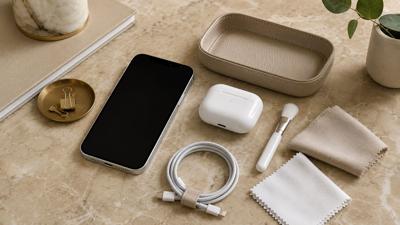
A simple kit makes it easier: a microfiber cloth, a few approved disinfecting wipes, a soft brush, and a clean place to let everything dry. Keep the kit in your desk drawer, travel bag, or nightstand so the task does not become a production.
The goal is not perfection. It is maintenance. When you clean your iPhone the right way, it looks better, feels better, charges more reliably, and lasts longer without needing risky DIY fixes.
Think of it like caring for a good handbag, sunglasses, watch, or pair of leather shoes. It is part function, part presentation, and part protecting something you use every single day.

(0) comments
We welcome your comments
Log In
Post a comment as Guest
Keep it Clean. Please avoid obscene, vulgar, lewd, racist or sexually-oriented language.
PLEASE TURN OFF YOUR CAPS LOCK.
Don't Threaten. Threats of harming another person will not be tolerated.
Be Truthful. Don't knowingly lie about anyone or anything.
Be Nice. No racism, sexism or any sort of -ism that is degrading to another person.
Be Proactive. Use the 'Report' link on each comment to let us know of abusive posts.
Share with Us. We'd love to hear eyewitness accounts, the history behind an article.