

At some point, the setup stops working. Maybe it's the neck ache that arrives every afternoon without fail. Maybe it's realizing you've been sitting in the same position for six hours and your back can't handle that. Whatever the trigger, once you start thinking about a standing desk you tend to wonder why you waited so long.
The problem is the market is genuinely overwhelming. Walk into any office furniture store or spend twenty minutes on Google and you'll find cheap fixed-height options sitting next to motorised desks at every price point, spec sheets full of numbers that don't translate into anything useful, and review articles that somehow make the decision harder rather than easier. It's a lot. This guide focuses on what actually makes a difference when you're trying to pick the right desk for your space.
What exactly to look for before you buy
Most people go straight to price when looking for the best standing desk for home office. Understandable. But there are a few things worth sorting out before the budget conversation even starts.
Stability at standing height is the one area where cheaper desks consistently let you down. Wobble at full height turns every typing session into a minor annoyance and every video call into something you're self-conscious about. Wide leg frames and solid crossbars help significantly. Before buying anything, search the reviews specifically for wobble mentions. If three different people bring it up independently, that's not bad luck, that's the desk.
Most buyers underestimate the motor quality until they're living with a bad one. A dual-motor system distributes the load properly and handles heavier setups without straining. Factor in two monitors, a desktop tower, a couple of peripherals, and the weight adds up faster than you'd expect. Check the rated capacity and build in some headroom above your actual load. Buying a desk that's technically capable of holding your setup is not the same as buying one that handles it comfortably over several years.
Height range gets overlooked surprisingly often. The minimum height matters for shorter users who might find the desk too high even at its lowest setting. The maximum needs to comfortably accommodate your standing height with proper ergonomics. Both ends of the range deserve a look before you commit.
Surface size is worth thinking through honestly. 120 centimetres wide is a reasonable minimum for most home office setups. Running dual monitors comfortably usually means 140 to 160 centimetres. Bigger isn't always better, but undersizing a desk is a decision you'll regret every single day.
It’s better to pay attention to warranty length. A manufacturer offering five years or more on the frame is essentially telling you they expect it to last. One offering twelve months is telling you something too.
Best standing desks for home office use
For anyone spending the bulk of their working day at a desk, the priority list is fairly consistent. Stability, a decent height range, quiet motor operation, and enough surface to spread out without things feeling cramped.
Memory presets are more useful than they sound. When switching positions takes a single button press rather than holding up and down buttons for ten seconds, you actually do it. That sounds like a small thing until you realise that's the entire reason most people stop using the standing function within a few weeks. Friction kills habits. Remove the friction.
Anti-collision is worth having too. If something gets in the path of the desk while it's moving, it stops and reverses rather than ploughing through whatever's in the way. Hopefully you never need it. Good to have anyway.
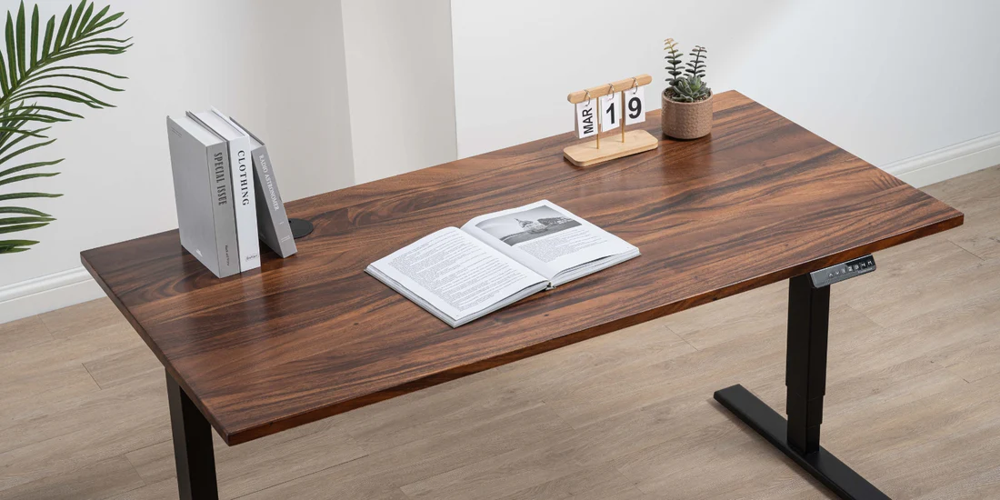
Surface material is one of those things you don't think about until you've been using a desk for six months and it's already showing wear. A decent laminate handles scratches and the occasional drink spillage. Some premium options come with a textured finish that feels more substantial under your hands than the standard glossy surface. Not essential, but once you've used one it's hard to go back.
Best options for gaming rooms
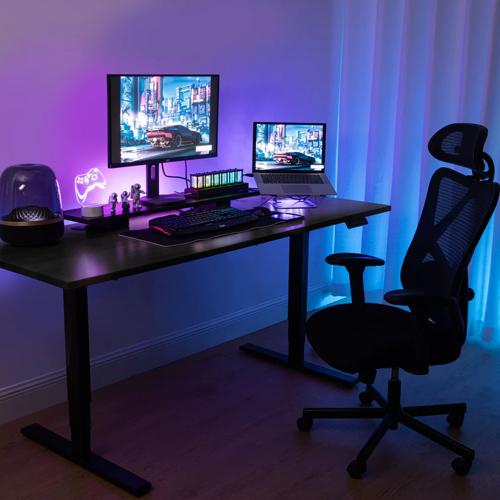
Gaming setups have specific demands that push things in a slightly different direction. Screen real estate tends to be larger. Ultrawide monitors, dual screen configurations, desktop towers, DACs, headphone stands, various peripherals. All of that needs a home on the surface without everything feeling like a compromise.
Width is probably the first thing to sort out. A 34-inch ultrawide or a dual monitor setup needs at least 140 centimetres to breathe. 160 centimetres gives you proper room to work without constantly shuffling things around. If you have corner space available, an L-shaped configuration is genuinely worth considering. It separates your primary monitor zone from a secondary area for peripherals and controllers, and makes the whole setup feel more intentional.
Cable management deserves more attention in gaming setups than anywhere else. Built-in grommets, a tray underneath, provision for a cable spine. Any of these help contain what can otherwise become a genuine mess of wires behind and under the desk. A clean desk improves the experience of sitting down to use it more than people expect until they've tried both.
If you play standing as well as sitting, motor noise during adjustment matters more than it might in an office environment. A quiet, smooth motor that doesn't disrupt a session when you decide to raise or lower mid-game is worth paying slightly more for.

Home office vs gaming: where the needs actually differ
The overlap between a good home office desk and a good gaming desk is significant. Most of the core requirements are identical. The main differences come down to surface size and cable management, where gaming setups tend to push harder.
Surface width: home office setups generally work well at 120 to 140 centimetres. Gaming setups often need 140 to 160 centimetres or more. Motor noise matters in both cases, just for different reasons. Memory presets are genuinely essential for home office use and useful but not critical for gaming. Cable management is a moderate concern for office work and a high priority for gaming. Load capacity follows a similar pattern. An L-shaped option is occasionally worth considering for office use and often ideal for gaming rooms with the corner space to accommodate it.
Many people end up buying the same desk for both purposes, which is a reasonable approach. Just make sure the size is enough for the gaming use case and everything else follows.
Getting the ergonomics right
Buying the right desk is only part of it. How you set it up determines how much of the benefit you actually get.
Seated position first. Elbows at roughly 90 degrees, shoulders relaxed, wrists neutral, top of the monitor at or just below eye level. Most people have heard this a hundred times and set up their desk completely differently anyway. Worth actually checking before you assume yours is fine.
Standing height typically sits around 20 to 30 centimetres above your seated position, though this varies depending on your proportions. The same elbow angle applies either way.
Get a mat if you plan to stand for any real stretch of time. Hard floors are unforgiving after about half an hour and that discomfort is usually what kills the habit before it forms. The mat is cheap relative to the desk and makes a bigger difference.
Start with short intervals. Twenty or thirty minutes standing for every 90 minutes sitting is a comfortable place to begin. Most people find their own rhythm within a few weeks without having to think about it much.
Getting more out of it long term
Set up your memory presets on day one. Position the monitor correctly from the start rather than adjusting it six months later. Add the mat. Get a supportive chair as part of the overall setup. These things matter more together than any single element does on its own.
A monitor arm is worth adding if the budget allows. It decouples your screen height from the desk surface, so you can get the ergonomics right when sitting and right when standing without one position compromising the other. Fixed stands can't do that.
A well-built desk just keeps working. No motor that starts groaning after eighteen months, no surface that looks tired after two years of daily use. You're spending a meaningful amount of time with this desk. Probably, more than 40 hours a week if you're working from home. Buying something that was built to last that kind of use is one of those decisions that tends to age well.


(0) comments
We welcome your comments
Log In
Post a comment as Guest
Keep it Clean. Please avoid obscene, vulgar, lewd, racist or sexually-oriented language.
PLEASE TURN OFF YOUR CAPS LOCK.
Don't Threaten. Threats of harming another person will not be tolerated.
Be Truthful. Don't knowingly lie about anyone or anything.
Be Nice. No racism, sexism or any sort of -ism that is degrading to another person.
Be Proactive. Use the 'Report' link on each comment to let us know of abusive posts.
Share with Us. We'd love to hear eyewitness accounts, the history behind an article.