
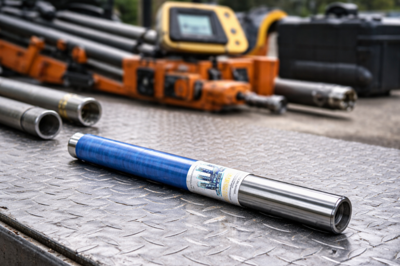

If you are replacing a failed transmitter or sorting through older DigiTrak part names, this question matters. A locator and transmitter must match. If they do not, the system will not work the way you expect.
Here is the short answer. The DigiTrak 5XD 19/12 is an older F5-family dual-frequency transmitter. It is compatible with a DigiTrak F5 locator. It is not compatible with Falcon F5 or Falcon F5+ locators. Current DCI compatibility language also does not present it as an F2-compatible transmitter. That is the practical answer most contractors need before they buy a replacement.
The confusion usually starts with the name. Older documents use 5XD 19/12. Later DCI materials use F5D 19/12 for the same F5-era dual-frequency transmitter family. In the field and on the secondary market, both names still appear. That makes buyers wonder whether the 5XD 19/12 is a separate model or a transmitter that works across several locator platforms. It is not. It belongs to the F5 family, and that is what drives compatibility.
This guide breaks down what the 5XD 19/12 is, which locators it works with, what you need to check before you buy one, and how UCG HDD can help you get the right replacement for the locator you already run.
The quick answer: yes for DigiTrak F5, no for Falcon
The cleanest way to answer the compatibility question is to separate the older F5 platform from the Falcon platform. The DigiTrak 5XD 19/12 belongs to the F5 side. That means it works with a DigiTrak F5 locator when the setup is correct. It does not work with Falcon F5 or Falcon F5+ locators because Falcon uses a different transmitter platform.
That point matters because the product names can mislead people. The word “DigiTrak” appears across several product generations, but the systems are not interchangeable. The 5XD 19/12 was built around the F5 platform and its supported frequencies. Falcon moved to a different wideband system. So even though the names sound close, the hardware does not cross over.
There is one more layer to the answer. Even with the right locator family, the setup still has to match. The receiver must be set to the correct transmitter type and the correct frequency. The regional designation must match. The system should also be calibrated before use, especially when you are changing the transmitter, receiver, housing, or optimized band. In other words, “compatible with F5” does not mean every installation is automatic.
For a U.S. HDD contractor, the practical rule is simple. If you run a DigiTrak F5 locator, the 5XD 19/12 can be the right match. If you run Falcon, it is not.
What the DigiTrak 5XD 19/12 actually is
The DigiTrak 5XD 19/12 is an F5-era dual-frequency transmitter. Its two operating frequencies are 19.2 kHz and 12.0 kHz. Older DCI documentation names the unit as 5XD 19/12. Later DCI F5 documentation uses the name F5D 19/12. That naming shift is the main reason buyers still ask whether they are looking at the same transmitter or two different models.
The answer is straightforward. The older name and the later name point to the same F5-family 19/12 dual-frequency transmitter class. Once you know that, the compatibility question becomes easier. You stop treating the 5XD 19/12 as a mystery part and start treating it as what it is: an older F5-family transmitter.
The physical specs help confirm that match. DCI’s F5 transmitter information lists the 19/12 dual-frequency transmitter as a 15-inch unit with a 1.25-inch diameter and a standard 65-foot depth/data range. DCI also notes mid-bore frequency selection for the 19/12 transmitters. Those details matter because compatibility is not only about the locator screen. It is also about whether the transmitter fits the housing and whether the system is set up to use the correct frequency.
So the 5XD 19/12 is not a universal DigiTrak transmitter. It is an F5-family dual-frequency transmitter with specific frequencies, dimensions, and setup requirements. That is the foundation for every compatibility decision that follows.
Which locators are compatible with the 5XD 19/12
Compatibility gets simpler once you sort by locator family instead of by brand name alone. The 5XD 19/12 is an F5-family transmitter. That puts the DigiTrak F5 in the yes column and Falcon in the no column.
Locator | Compatible with DigiTrak 5XD 19/12? | What to know |
DigiTrak F5 | Yes | This is the correct platform family for the 5XD 19/12 |
Falcon F5 | No | Falcon requires its own wideband transmitter platform |
Falcon F5+ | No | Same issue as Falcon F5 |
DigiTrak F2 | Not supported in current compatibility language | Current product split points F5 transmitters to F5 systems only |
That table gives the short answer, but many contractors need more than a yes-or-no line. Equipment changes hands. Paperwork gets lost. Older names stay in circulation. A quick table helps, but the real buying decision often depends on how your equipment is labeled and configured.
DigiTrak F5: the correct platform match
If your locator is a DigiTrak F5, the 5XD 19/12 is the correct platform match. This is the family the transmitter was built for. DCI’s F5 documentation and older DCI/FCC documentation place the 19/12 transmitter in the F5 line, not in Falcon and not in the newer wideband system.
That does not mean the label alone tells the whole story. The receiver still needs to be set to the proper transmitter option and to the proper frequency, either 19.2 kHz or 12.0 kHz. The regional designation also needs to match. If those settings do not line up, a compatible transmitter can still fail to communicate with the receiver the way it should.
This is why contractors should treat “works with F5” as the first check, not the last one. The correct platform family is essential, but the setup around it matters too. If you already run an F5 locator and need a replacement transmitter, the 5XD 19/12 is the family you should be looking at. UCG HDD can help confirm that match before you commit to the part.
Falcon F5 and Falcon F5+: not compatible
Falcon F5 and Falcon F5+ do not use the 5XD 19/12. DCI’s Falcon documentation is direct on this point. Falcon does not use other DigiTrak transmitters from older systems. It requires a Falcon F5 wideband, Falcon F2 wideband, or DucTrak transmitter.
That makes this one of the easiest compatibility calls in the article. If your locator is Falcon, the 5XD 19/12 is not the right answer. The similarity in naming causes confusion, but the product family does not change just because the brand does. Falcon is a different transmitter system.
This matters most when contractors are looking at older stock, used equipment, or listings that mix part names from different generations. A DigiTrak label by itself is not enough. You need the exact platform family. Once you identify Falcon on the locator, the 5XD 19/12 should be ruled out.
That simple distinction can save time. Instead of trying to force an F5-family transmitter into a Falcon setup, you can focus on the correct Falcon-compatible options from the start.
DigiTrak F2 and other systems: do not assume a match
The current DCI product split does not present the 5XD 19/12 as an F2-compatible transmitter. DCI’s current language separates F5 transmitters, which work with F5 systems only, from F Series transmitters, which work with F5 and F2. That distinction matters.
For that reason, contractors should not assume a 5XD 19/12 will work with an F2 locator just because both products carry the DigiTrak name. The source language points the other way. The safe reading is that the 5XD 19/12 belongs to the F5-only side of the compatibility split.
The same caution applies to other locator families. Brand overlap is not the same as system compatibility. A transmitter has to match the supported platform, the supported frequencies, and the receiver’s setup. If the locator is not an F5, you should not buy a 5XD 19/12 on assumption alone.
That is especially important when you are working from an incomplete parts list or old field notes. Before you order a replacement, confirm the locator model first. If the locator is not an F5, the 5XD 19/12 is not the safe choice.
What to check before you buy or install one
Even when the locator family is correct, you still need to check the setup. This is where many compatibility problems show up. The transmitter may be right in principle, but something else in the system can still prevent proper operation.
Start with the locator model. Confirm the exact receiver platform. If it is an F5, you are in the correct family for the 5XD 19/12. If it is Falcon, stop there. The transmitter is not compatible with that system.
Next, check the frequency. The 5XD 19/12 operates at 19.2 kHz or 12.0 kHz. The receiver must be set to the correct transmitter option and the correct frequency. If the receiver is set wrong, the system may not read the transmitter correctly.
Then confirm the regional designation. DCI states that the receiver and transmitter must have matching regional designation numbers to communicate and to meet local operating requirements. That is not a minor detail. It is part of the compatibility check.
After that, look at the hardware around the transmitter. DCI’s F5 transmitter information notes that the drill head needs the proper slotting for signal performance and battery life, and that some housings may require a battery cap adapter. Finally, calibrate the system before use. DCI requires calibration before first use and when you change the transmitter, receiver, housing, or optimized band.
Frequency, designation, and receiver setup
Most compatibility problems start with setup, not with the part name on the shell. A 5XD 19/12 may be the correct transmitter family, but the receiver still has to be set up to read it. That means choosing the proper transmitter option in the receiver and selecting the correct operating frequency.
With this transmitter, the two frequencies are 19.2 kHz and 12.0 kHz. If the receiver is looking for the wrong frequency, the system will not behave as expected. The same goes for the transmitter type selection in the receiver menu. A mismatch here can make a working transmitter look like the wrong part.
The regional designation check belongs in the same category. DCI states that the receiver and transmitter must carry matching regional designation numbers. If they do not match, communication and compliance become problems. That is why a compatibility check should always include more than the model name.
The practical takeaway is simple. Before you decide a 5XD 19/12 is wrong, make sure the receiver is set correctly and make sure the designation matches. Those are core parts of the setup, not afterthoughts.
Housing fit, slotting, and calibration
The transmitter does not work in isolation. The housing matters. DCI’s F5 transmitter information states that the drill head needs the proper slotting for signal emission and battery life. DCI also notes that some housings may require a battery cap adapter.
Those points matter because a transmitter can be the correct family and still perform poorly in the wrong housing setup. If the fit is wrong or the housing is not configured the way the transmitter expects, the system can become harder to read in the field.
Calibration is the other key step. DCI requires calibration before first use and whenever you change the transmitter, receiver, housing, or optimized band. That instruction is easy to overlook, but it belongs in any serious compatibility discussion. When hardware changes, calibration helps the system read the new setup properly.
So before you install a 5XD 19/12 and call the job done, check the housing, confirm any cap requirements, and calibrate the system. Those steps are part of making a correct transmitter work as intended.
When it makes sense to call UCG HDD
Sometimes the compatibility answer is easy. You confirm that your locator is a DigiTrak F5, you need a 19/12 dual-frequency F5-family transmitter, and the 5XD 19/12 is the match. In that case, the job is mostly about getting the right part and confirming the setup.
But not every situation is that clean. Older DigiTrak equipment often carries more than one part name in the field. One document may say 5XD 19/12. Another may say F5D 19/12. If the equipment history is incomplete, that can slow down the buying decision.
That is where UCG HDD can help. Instead of guessing from an old label or trying to sort through part names on your own, you can work from the key checks that matter: locator family, supported frequency, regional designation, housing fit, and calibration requirements. Those are the checks that determine whether the transmitter will work with your system.
The short conclusion stays the same. The DigiTrak 5XD 19/12 is compatible with a DigiTrak F5 locator. It is not compatible with Falcon F5 or Falcon F5+ locators. Current DCI compatibility language also does not place it in the F2-compatible transmitter group. If you want help matching the right replacement to your existing setup, UCG HDD can help you sort out the details and move toward the correct part.


(0) comments
We welcome your comments
Log In
Post a comment as Guest
Keep it Clean. Please avoid obscene, vulgar, lewd, racist or sexually-oriented language.
PLEASE TURN OFF YOUR CAPS LOCK.
Don't Threaten. Threats of harming another person will not be tolerated.
Be Truthful. Don't knowingly lie about anyone or anything.
Be Nice. No racism, sexism or any sort of -ism that is degrading to another person.
Be Proactive. Use the 'Report' link on each comment to let us know of abusive posts.
Share with Us. We'd love to hear eyewitness accounts, the history behind an article.