
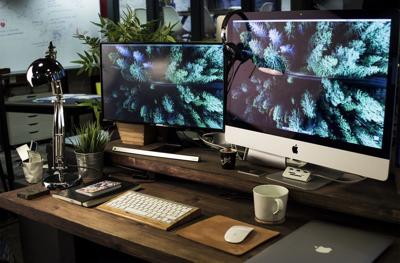

Working from home quickly loses its appeal when your “office” is a laptop balanced on the dining table. Before long, papers spread across the room, cables tangle underfoot, and what was meant to be a focused workspace becomes another source of distraction.
A well-designed home office does not require an enormous room or an elaborate renovation. It does, however, require more thought than placing a desk against an available wall. The most successful spaces respond to the work being done, support movement throughout the day, control glare and household noise, and still feel connected to the design of the home.
Learning how to set up a home office begins with looking beyond individual pieces of furniture. The desk, chair, lighting, storage, technology, and decorative details need to function as one environment—one that feels professional during working hours but does not overwhelm the rest of the home when the computer closes.
Plan the Office Around the Way You Work
Great office design starts with daily habits, not furniture catalogs.
Match the space to the work being performed. Video-heavy roles require noise control and effective lighting, creative work may demand a larger surface for materials, and focused writing calls for quiet and comfort. Partners sharing one room generally need distinct work zones rather than a single oversized desk.
Next, take inventory of the equipment used throughout the day. Monitors, chargers, active notebooks, and other hourly essentials should remain within easy reach, while supplies needed only occasionally can be stored behind cabinet doors.
Designing around a real workflow prevents a common mistake: creating a space that looks impressive but fails during everyday use.
Choose the Location Carefully
A dedicated room with a closing door is ideal, but it is not the only workable option. A guest room, upstairs landing, alcove, converted closet, or quiet section of a larger living area can become an effective workspace when its boundaries are clearly defined.
Look for a location with dependable internet service, convenient electrical access, adequate ventilation, and some separation from the busiest parts of the house. A beautiful desk beside the kitchen may seem inviting until conversations, appliances, deliveries, and meal preparation begin competing for attention.
Natural light is valuable, but the brightest room is not automatically the most practical one. Watch how sunlight moves through the space over several hours. A peaceful morning exposure can become harsh screen glare by midafternoon.
When deciding how to set up a home office in a shared room, visual boundaries become particularly important. A rug, freestanding bookcase, folding screen, paint treatment, or change in lighting can distinguish the work area without constructing a wall.
Position the Desk Before Decorating the Room
The desk influences how nearly every other part of the office will function, so establish its position before choosing artwork, shelving, or decorative accessories.
Whenever possible, place the desk so a window sits to the side rather than directly behind or in front of the monitor. This arrangement allows daylight into the room while reducing reflections and sharp differences between the brightness of the screen and its surroundings.
Consider what will appear behind you during video calls. A view into a cluttered hallway or an unmade guest bed can undermine an otherwise polished workspace. A simple wall with artwork, a shallow bookcase, or carefully edited shelving usually appears more intentional.
The desk should also provide enough depth to position a screen comfortably without pushing the keyboard against its front edge. Frequently used devices should remain within easy reach, while the area beneath the desk should stay open enough to change leg positions without colliding with boxes, cords, or wastebaskets.
Choose a Desk That Allows the Day to Change
No single position remains comfortable indefinitely. A useful home office should make it easy to sit, stand, shift, and occasionally step away rather than expecting the body to hold one supposedly perfect posture for eight hours.
The MarinaMantra Flow Floor-to-Standing Desk offers more flexibility than a conventional sit-stand model. Its height is adjustable, allowing you to move between floor sitting, standard seated work, and standing positions. Built-in power access and cable management also help keep cords and charging equipment from spreading across the workspace.
This flexibility highlights a core principle of workspace design: furniture should adapt to human movement, not force you into a static posture.
Ultimately, an adjustable desk isn't about standing continuously. Its true value lies in how easily it lets you transition between postures long before physical discomfort sets in.
Build the Workstation Around the User
A comfortable workstation begins with proportion. The desk, chair, screen, and surrounding space should feel arranged around the person using them rather than forcing the user to adapt to furniture that is too high, too low, or poorly positioned.
The chair should allow the shoulders to remain relaxed and the hands to reach the keyboard comfortably. The screen should sit directly ahead at a natural viewing height, while frequently used items should remain close enough to reach without repeated twisting or stretching.
Laptop users may find that raising the screen and adding a separate keyboard and mouse creates a more balanced setup for longer work sessions. Those using multiple monitors should position the screens close together so the eyes and head can move naturally between them.
The goal is not to create a rigidly measured workstation. It is to establish an arrangement that feels intuitive, allows for small changes in posture, and remains comfortable as the day progresses.
Layer the Lighting
Lighting should adapt to the rhythm of the day, not force you to work under the sterile glow of a single overhead fixture. The most effective spaces layer natural light, ambient warmth, and focused task illumination to keep the room comfortable from morning to night.
Start at the window. Sheer panels or adjustable shades temper harsh sunlight, reducing screen glare without stripping the room of daylight or compromising how the space appears during video calls. On the desk, choose an adjustable task lamp positioned to illuminate papers and other close work without reflecting across the monitor.
As afternoon fades into evening, ambient sources such as a warm floor lamp, wall sconce, or shaded side light can soften the transition. Layering these sources gives the room greater depth and allows an active daytime workspace to feel calmer and more inviting after hours.
Integrate Technology Without Letting It Take Over
Technology is essential to a functional home office, but it should not dominate the room visually. Screens, chargers, power cords, and accessories are easier to live with when they feel integrated into the design rather than added as an afterthought.
Plan power access around the desk before the room is fully arranged, particularly when using an adjustable model. Concealed outlets, under-desk power strips, cable trays, and discreet channels can keep connections accessible while preserving a clean, composed appearance.
Wireless equipment may reduce visible clutter, but every device still needs a place to charge. A dedicated charging drawer or concealed station prevents phones, headphones, and small accessories from gradually spreading across the desktop.
The goal is not to hide every sign of technology. It is to create a workspace where equipment supports the day without becoming the room’s defining feature.
Make Storage Feel Considered
Effective storage should make the office feel calmer, not simply provide more places to put things. The most successful arrangements balance easy access with enough concealment to prevent paperwork, supplies, and equipment from overtaking the room.
Closed cabinetry works well for files, office supplies, and items that do not need to remain visible. Open shelving feels more intentional when it is carefully edited, with space left between books, artwork, and a small number of meaningful objects.
Vertical storage can be especially valuable in a compact office. Tall cabinets, floating shelves, and shallow bookcases preserve floor space while giving the room structure and visual height.
A well-organized office should never feel overmanaged. It should simply make everyday essentials easy to find while allowing the rest of the room to remain composed.
Design the View Behind the Desk
The space framing your desk should feel like a natural continuation of the room, not a backdrop arranged solely for a lens. When it reflects the same palette, materials, and quiet restraint found elsewhere in the office, it reads as effortless both on screen and in person.
A statement piece of art, a thoughtfully edited bookcase, or a single architectural plant adds depth without feeling staged. The most compelling arrangements allow for negative space, letting individual elements breathe rather than overcrowding shelves and surfaces.
Balance the perspective looking into the room as carefully as the sightline from your seat. When furniture placement, color, and lighting operate in harmony, the space remains composed from every angle throughout the day.
Let the Office Belong to the Home
Professional does not have to mean corporate.
A home office should relate to the architecture, materials, and colors used throughout the house. A wood desk, upholstered chair, textured rug, linen window treatment, or thoughtfully framed artwork can soften the presence of technology without compromising function.
Color can give the room a stronger sense of identity. Muted greens, warm neutrals, deep blues, and earthy shades can create a grounded atmosphere, while lighter hues may help a compact office feel more open.
Edit decorative pieces carefully. One meaningful photograph or object often has more presence than a desktop crowded with accessories. Leave enough empty space for the room—and the person working in it—to breathe.
Design for Acoustic Comfort
Acoustic comfort is an often-overlooked dimension of interior design, particularly when a workspace adjoins active living areas.
A solid-core door can provide the clearest separation, but much of a room’s sound quality comes from the way materials are layered. Hard, reflective surfaces amplify surrounding noise and create echo, while softer textures help quiet the space without compromising its appearance. A wool rug, floor-to-ceiling drapery, upholstered seating, and well-filled bookshelves can work together to absorb reverberation and create a more settled atmosphere.
Architectural acoustic panels can also become part of the design. Wood-slat systems and sculptural felt panels can be incorporated into wall treatments or millwork, allowing sound control to feel intentional rather than purely functional.
Noise-canceling technology may offer temporary relief from daily disruption, but a well-designed workspace addresses sound more fundamentally. The goal is to create a room where quiet feels inherent to the space rather than dependent on another device.
Define the Threshold
One of the most overlooked aspects of workspace design is deciding how the room closes at the end of the day.
When an office occupies a dedicated room, shutting the door creates a natural boundary. In a multi-use or open-concept space, that transition must be established more deliberately. Conceal the laptop, close cabinet doors, clear the desk surface, and shift from focused task lighting to softer ambient lamps. These small rituals signal that the workday has ended and the room has returned to the home.
An exceptional home office is not defined by an abundance of technology or elaborate furnishings, but by the quiet removal of friction. Light feels balanced, movement comes easily, essential tools are intuitively placed, and visual distractions remain controlled.
Designed well, a workspace can support professional ambition without allowing work to compromise the sense of sanctuary that makes a home feel restorative.
Related Articles You May Enjoy From FINE Magazine
How to Make Long Screen Days Feel Less Exhausting
7 Home Office Paint Colors: Selection and Presentation
Small Interior Upgrades That Can Improve the Look and Feel of Your Home

(0) comments
We welcome your comments
Log In
Post a comment as Guest
Keep it Clean. Please avoid obscene, vulgar, lewd, racist or sexually-oriented language.
PLEASE TURN OFF YOUR CAPS LOCK.
Don't Threaten. Threats of harming another person will not be tolerated.
Be Truthful. Don't knowingly lie about anyone or anything.
Be Nice. No racism, sexism or any sort of -ism that is degrading to another person.
Be Proactive. Use the 'Report' link on each comment to let us know of abusive posts.
Share with Us. We'd love to hear eyewitness accounts, the history behind an article.