
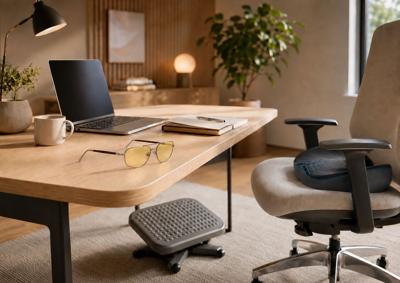
A long screen day rarely announces itself as a problem.
It begins with one email before breakfast. Then comes the video call, the document that needs another revision, the browser tabs multiplying across the top of the screen, and the phone checked between each task. By late afternoon, your shoulders have crept toward your ears, your feet have tried every available position beneath the desk, and the monitor suddenly feels much brighter than it did that morning.
Then the workday ends, and you relax by turning on another screen.
For most people, abandoning technology is neither realistic nor particularly desirable. Screens connect us to our work, travel plans, entertainment, friends, finances, and nearly every practical detail of modern life. The more useful question is not how to escape them entirely, but how to make long screen days feel less exhausting.
The answer is rarely an expensive office overhaul. It is usually a series of small changes that remove the irritations we have gradually learned to accept.
Raise the Screen Before Blaming Your Neck
Laptops are wonderfully portable and surprisingly good at convincing us to fold ourselves over them.
Because the screen and keyboard are attached, the most convenient position for the hands is rarely the best position for the head and neck. Hours later, you may realize you have spent much of the day looking downward as though the computer has been sharing secrets at the bottom of the desk.
Raise the laptop until the screen is closer to a comfortable viewing height, then add a separate keyboard and mouse. A proper stand or adjustable monitor arm provides the most flexibility, although a temporary stack of sturdy books can help determine whether screen height is contributing to the problem before you buy anything.
Distance matters too. The screen should be close enough to read without leaning forward, but not so close that it dominates your field of vision. Increasing the text size is often a better solution than gradually bringing your face closer to the display.
Position the screen far enough away that you can read comfortably without leaning forward, and keep it near a natural viewing height rather than forcing yourself to look sharply downward.
There is no single posture worth holding all day. The best setup is one that allows you to sit back, see clearly, and shift position without repeatedly correcting yourself.
Stop Working in the Dark
A glowing laptop in a dark room may look cinematic, but it becomes much less appealing after several hours.
When the screen is the brightest object in the room, the contrast can make the entire workspace feel harsher. Add a shaded table lamp, a wall light, or soft ambient lighting nearby. The purpose is not to flood the room with brightness, but to prevent the display from becoming a spotlight aimed directly at your attention.
Daylight can create the opposite problem. A window behind the monitor forces the screen to compete with the outdoor brightness, while a window behind you can turn the display into a mirror.
Whenever possible, position the desk so the window sits to one side. Sheer curtains or an adjustable shade can soften direct sunlight without sacrificing the atmosphere that makes a naturally lit workspace so appealing.
Layered lighting also makes a home office feel like part of the house rather than a temporary equipment station. A combination of ambient light and a focused desk lamp is more flexible than relying on one aggressive ceiling fixture.
That same principle applies beyond the office. Thoughtful lighting, storage, and material choices can help any multipurpose room feel more intentional, as explored in How to Create a Functional and Stylish Living Space.
Give Your Eyes Somewhere Else to Go
Switching from a laptop to a phone is not much of a visual break.
The content may change, but your eyes are still focused at close range. That is why an hour spent scrolling can leave you feeling no more refreshed than the work session that came before it.
The American Optometric Association recommends the 20-20-20 approach: approximately every 20 minutes, look at something about 20 feet away for at least 20 seconds. It is simple enough to remember and subtle enough to use without disrupting the day. The AOA offers additional guidance on digital eye strain and screen habits.
A window makes this easy. Look outside while considering your next sentence, take a call from the other side of the room, or let your gaze settle on a distant object between meetings.
Screen-focused eyewear can also become part of a more considered routine. GUNNAR’s Witcher computer and gaming glasses add some welcome personality to a category that has not always been known for style. The frames feel distinctive without looking like office safety equipment, allowing them to move easily between work, travel, gaming, and evening entertainment.
They are not presented as a cure for a long day, nor should they replace sensible lighting and regular breaks. They are simply one more way to make hours spent in front of a screen feel less improvised.
Pay Attention to Your Feet
Most people adjust the chair, move the monitor, and forget everything happening below the desk.
That oversight can influence the rest of the seated position. When the chair is raised high enough for the arms to align comfortably with the work surface, the feet may no longer rest fully on the floor. The body compensates by sliding forward, tucking one leg underneath the chair, or bracing the feet against whatever happens to be nearby.
A footrest can create a more stable place to land without requiring a new desk or chair.
The HUANUO Textured Surface Footrest is useful because it does not force the feet to remain in one fixed position. Its adjustable height and tilting platform allow the angle to change throughout the day, while the textured surface and center rollers provide another outlet for small movements while seated.
It is not an accessory every office needs. If both feet already rest comfortably on the floor, adding something beneath the desk may create clutter rather than solve a problem.
Its value becomes clearer for shorter users, shared workstations, or anyone whose chair and desk heights never seem to cooperate. The best office accessories often work this way: they address one recurring annoyance and then quietly disappear into the routine.
Move Before Your Body Starts Negotiating
Even the most supportive chair cannot make eight motionless hours feel good.
Screen work encourages stillness because concentration narrows the world to whatever is happening on the display. By the time you notice the tension in your shoulders or lower back, discomfort has already become part of the day.
Move before you need to.
Stand after a meeting. Refill your water before beginning the next project. Walk while returning a call. Stretch while a file uploads. These natural transitions are easier to maintain than an elaborate routine that requires alarms, equipment, and the discipline of a professional athlete.
Small adjustments while seated also matter. Shift your feet, lean back, uncross your legs, or move to another chair while reading something less demanding.
Comfort does not come from discovering one perfect position and holding it indefinitely. It comes from having several reasonable positions and moving between them before any one becomes uncomfortable.
Make the Desk Feel Less Like a Machine
A screen-heavy workspace can quickly become visually cold.
Monitors, chargers, cables, keyboards, adapters, and unused devices begin to occupy every surface. The room may function perfectly while still feeling like somewhere you would rather leave.
Begin with the equipment that no longer earns its place. Remove old devices, tangled cords, empty packaging, and the paperwork that has been waiting for attention since last month.
Give frequently used items a permanent home. Concealed charging stations, cable trays, closed drawers, and small organizers can keep the practical pieces within reach without allowing them to dominate the room.
Then add something with no measurable effect on productivity.
A framed photograph, a beautiful notebook, a ceramic object, fresh greenery, or a small work of art can soften the presence of technology and connect the desk to the rest of the interior.
There is no need to pursue an empty, picture-perfect workspace unless that genuinely helps you think. Some people prefer a nearly bare desk. Others work best surrounded by books, samples, photographs, and several pens that all produce almost the same shade of black.
Remove what distracts you. Keep what makes the room feel like yours.
Silence What Has Not Earned Your Attention
Physical discomfort is only one reason long screen days feel exhausting.
Constant interruption can turn a manageable workload into something that feels relentless. An email arrives, followed by a message, followed by a calendar reminder about the meeting you are already attending.
Not every alert deserves to interrupt a thought.
Disable notifications that do not require immediate attention. Check email at intentional intervals when the work allows it. Use focus settings during projects that require more than a few uninterrupted minutes.
This is not about becoming unreachable. It is about deciding when the screen is serving you and when it has quietly started directing the day.
The same boundary matters when work ends. Close unnecessary programs, clear the coffee cup, and put the laptop away when the office shares space with a living room or bedroom.
A small closing ritual can help the room stop feeling like work, even when the commute home consists of three steps.
Build a Setup for Your Actual Life
The ideal office seen online usually has enormous windows, an immaculate desktop, hidden wiring, and no evidence that anyone has ever needed to print a return label.
Real work happens in more complicated places.
It happens at kitchen counters, dining tables, hotel desks, airport lounges, spare rooms, and offices shared by people of different heights. It happens between school pickups, flights, appointments, deliveries, and the laundry waiting just outside the camera frame.
Choose solutions that fit those realities.
A portable laptop stand may be more useful than a permanent monitor arm when you travel frequently. A footrest may improve the day more than an expensive chair when the real problem is that your feet cannot reach the floor comfortably. Screen-focused glasses may be worthwhile when your computer time moves seamlessly from work into gaming or entertainment.
The growing overlap between work, home, and personal style is also changing what people expect from everyday products. How Comfort-Focused Fashion Is Changing Modern Living looks at how clothing and accessories are adapting to more flexible routines.
The objective is not to collect more equipment. It is to notice which small frustrations repeat every day and solve those first.
Make the Day Easier, Not Perfect
Long screen days will never feel entirely effortless.
Meetings will still run over. Emails will still arrive at inconvenient times, and the final task of the afternoon will occasionally turn into three more tasks.
The environment, however, can stop making everything harder.
Raise the screen. Soften the light. Give your eyes another distance to focus on. Let your feet rest somewhere useful. Move before stiffness begins. Turn off the notifications that do not matter.
Products such as GUNNAR eyewear and the HUANUO footrest belong in this conversation because they address two specific parts of the experience. Neither needs to become the center of the workspace, and neither is a substitute for better habits.
The most useful changes are rarely dramatic. They remove just enough friction to make the day feel calmer, more deliberate, and considerably less exhausting.
By the time the screen finally closes, that difference matters.
(0) comments
We welcome your comments
Log In
Post a comment as Guest
Keep it Clean. Please avoid obscene, vulgar, lewd, racist or sexually-oriented language.
PLEASE TURN OFF YOUR CAPS LOCK.
Don't Threaten. Threats of harming another person will not be tolerated.
Be Truthful. Don't knowingly lie about anyone or anything.
Be Nice. No racism, sexism or any sort of -ism that is degrading to another person.
Be Proactive. Use the 'Report' link on each comment to let us know of abusive posts.
Share with Us. We'd love to hear eyewitness accounts, the history behind an article.