
Every parent knows the feeling—that quiet dread that settles in when you leave your baby's room, wondering if they're sleeping soundly or need you. It's a universal anxiety that drives millions of parents to seek reliable monitoring solutions, yet the sheer volume of options on today's market can feel paralyzing. From basic audio-only devices to AI-powered smart cameras, the baby monitor landscape has exploded with choices that promise peace of mind but often deliver confusion instead.
For tech-savvy parents especially, the decision isn't simply about picking any monitor off the shelf. The real question is more nuanced: should you invest in a smart baby monitor with Wi-Fi connectivity and app-based controls, or opt for a dedicated non-WiFi unit that prioritizes signal reliability? And regardless of connectivity type, which features actually matter—does 2K night vision make a meaningful difference, or is it marketing hype? This guide cuts through the noise with a structured approach, walking you through the core differences between monitor types, the essential features worth prioritizing, and a practical step-by-step process to find the monitor that fits your family's specific needs.
Smart Baby Monitors vs. Non-WiFi Baby Monitors: Understanding the Core Differences
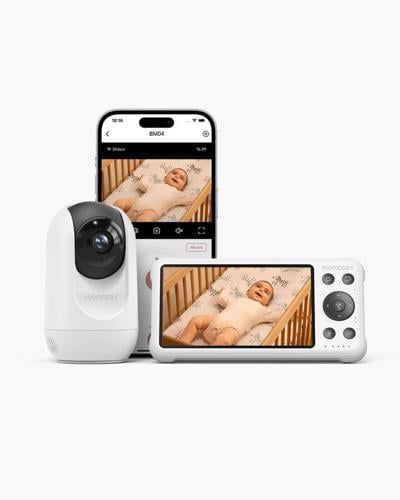
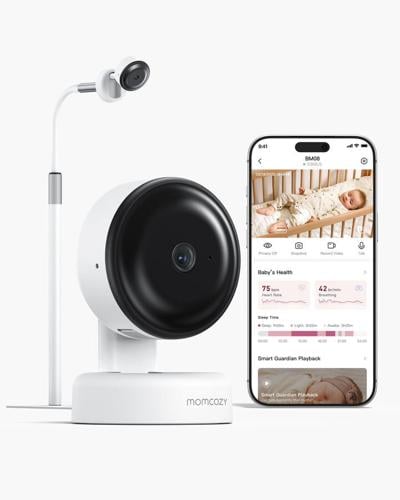
A smart baby monitor connects to your home's Wi-Fi network, streaming video and audio to a smartphone app from virtually anywhere—whether you're in the backyard or at the office. These devices function much like home security cameras tailored for nurseries, offering cloud storage, push notifications, and integration with smart home ecosystems. A non-WiFi baby monitor, by contrast, uses dedicated radio frequency (typically FHSS or DECT technology) to transmit directly between a camera unit and a portable parent unit, operating independently of your internet connection.

The technological distinction creates meaningful trade-offs. Smart monitors excel at remote access—you can check on your baby from another city, share access with grandparents, and receive AI-driven alerts about crying or movement patterns. They also update with new features through firmware upgrades. However, they depend entirely on your internet stability; a router hiccup means a black screen at the worst possible moment. They also introduce cybersecurity vulnerabilities that require ongoing attention.
Non-WiFi monitors prioritize connection reliability and simplicity. Because they communicate directly between units, they're immune to internet outages, bandwidth congestion, and hacking attempts. Latency is virtually zero—what happens in the nursery appears on your screen instantly. The trade-off is limited range (typically 300-1,000 feet) and no remote viewing beyond your property.
Choose a smart monitor if you travel frequently, want caregiver access from multiple locations, or plan to integrate monitoring into a broader smart home setup. Opt for non-WiFi if you prioritize rock-solid reliability, have security concerns about internet-connected cameras in your baby's room, or simply want a device that works without troubleshooting network issues. Many parents with larger budgets ultimately keep both—a smart monitor for remote peace of mind and a dedicated unit on the nightstand for overnight reliability.
Essential Baby Monitor Features for Modern Parenting
Once you've decided between smart and non-WiFi technology, the real differentiator becomes the feature set. Not every advertised capability delivers equal value, so understanding which features genuinely improve your monitoring experience helps you avoid overpaying for gimmicks while ensuring you don't miss what truly matters.
2K Night Vision: Ensuring Clear Visibility in Low Light
Babies spend most of their monitored hours in darkness, making night vision arguably the single most important visual feature in any monitor. Standard monitors offer 720p or 1080p infrared night vision, which produces grainy, washed-out images where it's difficult to distinguish whether your baby's eyes are open or if that dark spot on the sheet is a shadow or spit-up. A 2K resolution sensor captures four times the detail of 720p, rendering crisp images even in complete darkness. You can clearly see chest movement for breathing reassurance, spot a pacifier that's fallen nearby, or notice if your baby has rolled into an unsafe position. The practical safety benefit is substantial—you make fewer unnecessary trips into the nursery based on ambiguous images, and you catch genuine concerns faster. Monitors from brands like Momcozy, Eufy, and Infant Optics have embraced higher-resolution night sensors, though you should verify whether the advertised 2K applies to both daytime and nighttime modes, as some units downgrade resolution when switching to infrared.

Audio Capabilities and Two-Way Communication
Crystal-clear audio often matters more than video in day-to-day use. The best monitors employ noise-filtering technology that distinguishes between a baby's cry and background white noise, ensuring you're alerted to genuine distress rather than every rustle of bedsheets. Two-way communication transforms a passive monitor into an active soothing tool—when your baby stirs, you can offer a reassuring "shh" or sing a familiar phrase without physically entering the room and potentially escalating a minor wake-up into a full awakening. Smart monitors enhance this further with cry detection algorithms that classify sounds by urgency and send graded notifications to your phone, so a soft whimper doesn't trigger the same alert as full crying.
Connectivity, Range, and Smart Home Integration
Your home's layout should directly influence your connectivity choice. For apartments or smaller homes under 1,500 square feet, a non-WiFi monitor's standard range handles coverage easily. Larger homes, multi-story layouts, or properties with thick walls benefit from Wi-Fi monitors that aren't limited by physical signal degradation. Smart baby monitors that integrate with Alexa or Google Home allow hands-free check-ins—you can say "show me the nursery" to display the feed on a smart display while cooking dinner. App-based controls let you pan, tilt, and zoom remotely, adjust sensitivity settings, and review recorded clips. Look for monitors supporting both 2.4GHz and 5GHz bands, as dual-band compatibility reduces interference and improves streaming stability.

Additional Features: Temperature Sensors, Lullabies, and More
Room temperature monitoring provides genuine utility since overheating is a recognized SIDS risk factor—a built-in sensor that alerts you when the nursery drifts outside the recommended 68-72°F range adds a meaningful safety layer without requiring a separate device. Built-in lullabies and white noise options let you trigger soothing sounds remotely, useful during those 2 AM wake-ups when you'd rather not leave your bed immediately. Motion detection with customizable zones helps you know the moment your toddler climbs out of the crib, while humidity sensors round out environmental monitoring for babies with respiratory sensitivities.
Step-by-Step Guide to Choosing Your Ideal Smart Baby Monitor
Knowing which features exist is one thing—translating that knowledge into a confident purchase decision requires a structured process. Rather than scrolling through endless product listings and getting swayed by marketing language, follow these five steps to systematically narrow your options and land on the monitor that genuinely fits your household.
Start by assessing your specific circumstances. Measure the distance between your baby's room and where you'll spend most of your time monitoring. Consider your home's construction—concrete walls and multiple floors demand stronger connectivity solutions. Think honestly about your tech comfort level: if troubleshooting Wi-Fi configurations frustrates you, a non-WiFi dedicated unit might serve you better despite its limitations. Also factor in whether caregivers, grandparents, or partners need remote access, which immediately points toward a smart monitor.
Next, establish a realistic budget range before you start browsing. This prevents feature creep—the tendency to keep upgrading your requirements simply because a slightly pricier model offers one more bell or whistle. Decide which two or three features from the previous section are non-negotiable for your family, then find the best execution of those features within your price range rather than chasing every possible capability.
With your requirements and budget defined, research three to five specific models that match your criteria. Compare them side by side on your priority features—particularly night vision quality, audio clarity, and connectivity reliability. Don't rely solely on manufacturer specs; seek out video reviews that show actual nighttime footage and real-world range tests. User reviews on parenting forums often reveal long-term reliability issues that professional reviews miss, such as apps that drain phone batteries or units that overheat after months of continuous use.

Finally, think about future-proofing. A monitor you buy for a newborn ideally serves you through toddlerhood. Consider whether the camera's field of view accommodates a toddler bed, whether the brand regularly updates its app, and whether the system supports additional cameras if you plan to expand your family. Choosing a monitor from a company with a strong track record of firmware updates and responsive customer support protects your investment well beyond the first year.
Advanced Considerations for Tech-Savvy Parents
If you're the type of parent who manages a smart home ecosystem and understands network architecture, your baby monitor evaluation should go deeper than basic feature comparisons. Data privacy deserves serious scrutiny—every Wi-Fi monitor streams footage of your child, and that data passes through servers you don't control. Before purchasing, investigate whether the manufacturer uses end-to-end encryption, where video data is stored (local vs. cloud, and which country those servers reside in), and whether the company has experienced any documented security breaches. Brands that offer local storage options alongside optional cloud subscriptions give you more control over your family's data.
Evaluate the app's permission requirements critically. A baby monitor app requesting access to your contacts or location data beyond what's functionally necessary is a red flag. Look for manufacturers that undergo third-party security audits and publish transparency reports. On the integration front, consider how the monitor fits into automated routines—triggering smart lights to dim when the baby falls asleep, or adjusting a smart thermostat based on nursery temperature readings. These automations require robust API support or compatibility with platforms like IFTTT, Home Assistant, or SmartThings. Finally, assess the brand's software update cadence. A company that patches vulnerabilities quickly and adds features over time protects both your security and your investment, while abandoned apps signal a product with a limited useful lifespan.
Matching the Right Monitor to Your Family's Needs
Choosing the right baby monitor comes down to understanding a few fundamental decisions and being honest about your family's priorities. The split between smart Wi-Fi monitors and non-WiFi dedicated units isn't about one being universally better—it's about matching the technology to your lifestyle. Remote access and smart home integration serve parents who travel or share caregiving duties across locations, while dedicated units deliver unmatched reliability for overnight monitoring without internet dependencies.
Among features, 2K night vision stands out as a genuinely impactful upgrade rather than a marketing gimmick—clearer nighttime images reduce false alarms and help you spot real concerns faster. Pair that with quality audio, appropriate connectivity for your home's layout, and environmental sensors, and you have a monitoring setup that actively supports safer sleep rather than just passively recording it.
The step-by-step process outlined here—assessing your needs, setting a budget, comparing priority features across specific models, and thinking about longevity—transforms an overwhelming market into a manageable decision. For tech-savvy parents, layering in security evaluations and ecosystem compatibility ensures your choice remains smart in every sense. Use this framework confidently, knowing that the best monitor isn't the most expensive or feature-packed one—it's the one that lets you step away from the nursery and genuinely breathe easier.
(0) comments
We welcome your comments
Log In
Post a comment as Guest
Keep it Clean. Please avoid obscene, vulgar, lewd, racist or sexually-oriented language.
PLEASE TURN OFF YOUR CAPS LOCK.
Don't Threaten. Threats of harming another person will not be tolerated.
Be Truthful. Don't knowingly lie about anyone or anything.
Be Nice. No racism, sexism or any sort of -ism that is degrading to another person.
Be Proactive. Use the 'Report' link on each comment to let us know of abusive posts.
Share with Us. We'd love to hear eyewitness accounts, the history behind an article.